Monday, May 27, 2019

Self practice website

After a few days of class, flex and lunch time. This is what I came to so far...

And this is what it looks like:
file:///Users/crystalzhang/Desktop/html%20files/index.html

What my plan is after this is I want to learn more about designing the website. Because the website right now is just a basic format and does not have lots of design. Big companies would never use a website like this.

Self practice project starting statement

I kind of got tired of learning and blogging a new lesson everyday. So I decided to do something different that is more fun to me and allows me to review what I have learned in the first two units. And so, I am going to---build a website.

This website is going to be about online shopping. I am going to make this web page an info page for a few of the shopping websites and also what they sell. The three website that I'm going to pick is Ebay, Amazon and Taobao.

And I am going to build this website from scratch which means only with code and nothing else.

Thursday, May 23, 2019

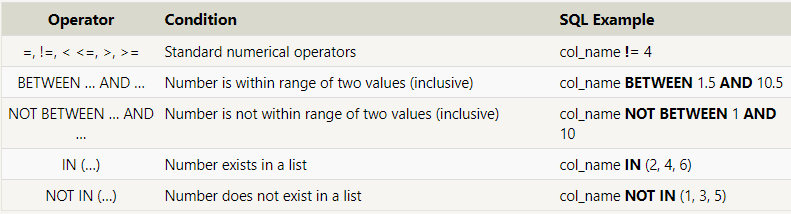
SQL(5)---Queries with constraints EXAMPLE

Queries with constraints
EXAMPLE:

  • Find the movie with a row id of 6

SELECT id, title FROM movies 
WHERE id = 6;

The table will look like:


  • Find the movies released in the year between 2000 and 2010


  • SELECT title, year FROM movies
    WHERE year BETWEEN 2000 AND 2010;

    The table will look like:


  • Find the movies not released in the years between 2000 and 2010

  • SELECT title, year FROM movies
    WHERE year < 2000 OR year > 2010;

    The table will look like:

  • Find the first 5 Pixar movies and their release year


  • SELECT title, year FROM movies 
    WHERE year <= 2003;


    The table will look like:

    NOTES: This was the example that I looked at to help my understanding of the lesson. 
    What I'll be doing tomorrow?
    Queries with constraints

    Wednesday, May 22, 2019

    SQL(4)---Manipulation

    Manipulation
    In order to create a Table, we use the code below:
    CREATE TABLE celebs ( id INTEGER, name TEXT, age INTEGER );

    The words in yellow can be replaced by other variable words and values.

    Then, to insert a row into the table, we use the code below:
    INSERT INTO celebs (id, name, age) VALUES (1, 'Justin Bieber', 22);

    The value row is the values you would put into the row of that table.

    Add columns to a table, we use:
    ALTER TABLE celebs ADD COLUMN twitter_handle TEXT; SELECT * FROM celebs;
    1. ALTER TABLE is a clause that lets you make the specified changes.
    2. celebs is the name of the table that is being changed.
    3. ADD COLUMN is a clause that lets you add a new column to a table: 
    • twitter_handle is the name of the new column being added
    • TEXT is the data type for the new column
    4. NULL is a special value in SQL that represents missing or unknown data. Here, the rows that existed before the column was added have NULL values for twitter_handle.
    The ALTER TABLE statement adds a new column to a table.

    Change existing records, we use:
    UPDATE celebs SET twitter_handle = '@taylorswift13' WHERE id = 4; SELECT * FROM celebs;


    1. UPDATE is a clause that edits a row in the table. 
    2. celebs is the name of the table. 
    3. SET is a clause that indicates the column to edit.

    The UPDATE statement edits a row in a table.

    Delete existing records, we use:
    DELETE FROM celebs WHERE twitter_handle IS NULL; SELECT * FROM celebs;
    1. DELETE FROM is a clause that lets you delete rows from a table.
    2. celebs is the name of the table we want to delete rows from.
    3. WHERE is a clause that lets you select which rows you want to delete. Here we want to delete all of the rows where the twitter_handle column IS NULL.
    4.IS NULL is a condition in SQL that returns true when the value is NULL and false otherwise.
    The DELETE FROM statement deletes one or more rows from a table.

    Used to tell the database to reject inserted data that does not adhere to a certain restriction.
    CREATE TABLE awards ( id INTEGER PRIMARY KEY, recipient TEXT NOT NULL, award_name TEXT DEFAULT 'Grammy' );
    1. PRIMARY KEY columns can be used to uniquely identify the row. Attempts to insert a row with an identical value to a row already in the table will result in a constraint violation which will not allow you to insert the new row.
    2. UNIQUE columns have a different value for every row. This is similar to PRIMARY KEY except a table can have many different UNIQUE columns.
    3. NOT NULL columns must have a value. Attempts to insert a row without a value for a NOT NULL column will result in a constraint violation and the new row will not be inserted.
    4. DEFAULT columns take an additional argument that will be the assumed value for an inserted row if the new row does not specify a value for that column.
    Constraints that add information about how a column can be used are invoked after specifying the data type for a column.

    REVIEW:
    SQL is a programming language designed to manipulate and manage data stored in relational databases.
    • relational database is a database that organizes information into one or more tables.
    • table is a collection of data organized into rows and columns.
    statement is a string of characters that the database recognizes as a valid command.
    • CREATE TABLE creates a new table.
    • INSERT INTO adds a new row to a table.
    • SELECT queries data from a table.
    • ALTER TABLE changes an existing table.
    • UPDATE edits a row in a table.
    • DELETE FROM deletes rows from a table.
    Constraints add information about how a column can be used.

    SQL(3)---Relational Database Management System(RDBMS)

    Relational Database Management System

    ------A relational database management system (RDBMS) is a program that allows you to create, update, and administer a relational database. Most relational database management systems use the SQL language to access the database. 

    • database is a set of data stored in a computer. This data is usually structured in a way that makes the data easily accessible
    • relational database is a type of database. It uses a structure that allows us to identify and access data in relation to another piece of data in the database. Often, data in a relational database is organized into tables. 

    Tables: Rows and Columns

    • Tables can have hundreds, thousands, sometimes even millions of rows of data. These rows are often called records.
    • Tables can also have many columns of data. Columns are labeled with a descriptive name (say, age for example) and have a specific data type.
    SQL syntax may differ slightly depending on which RDBMS you are using:

    SQLite is a popular open source SQL database. It can store an entire database in a single file. One of the most significant advantages this provides is that all of the data can be stored locally without having to connect your database to a server. It is a popular choice for databases in cellphones, PDAs, MP3 players, set-top boxes, and other electronic gadgets.
    MySQL is the most popular open source SQL database. It is typically used for web application development, and often accessed using PHP. The main advantages of MySQL are that it is easy to use, inexpensive, reliable (has been around since 1995), and has a large community of developers who can help answer questionsSome of the disadvantages are that it has been known to suffer from poor performance when scaling, open source development has lagged since Oracle has taken control of MySQL, and it does not include some advanced features that developers may be used to. 
    PostgreSQL is an open source SQL database that is not controlled by any corporation. It is typically used for web application developmentPostgreSQL shares many of the same advantages of MySQL. It is easy to use, inexpensive, reliable and has a large community of developers. It also provides some additional features such as foreign key support without requiring complex configuration. The main disadvantage of PostgreSQL is that it is slower in performance than other databases such as MySQL. It is also less popular than MySQL which makes it harder to come by hosts or service providers that offer managed PostgreSQL instances. 
    Oracle DB (Oracle Corporation owns Oracle Database, and the code is not open sourced.) is for large applications, particularly in the banking industry. Most of the world’s top banks run Oracle applications because Oracle offers a powerful combination of technology and comprehensive, pre-integrated business applications, including essential functionality built specifically for banks. The main disadvantage of using Oracle is that it is not free to use like its open source competitors and can be quite expensive. 

    SQL(2)---EXAMPLE

    Great Example of SQL
    • Find the title of each film
    SELECT title FROM Movies;
    (The table would print:)
    • Find the director of each film
    SELECT director FROM Movies;
    (The table would print:)
    • Find the title and director of each film
    SELECT title, director FROM Movies;
    (The table would print:)
    • Find the title and year of each film
    SELECT title, year FROM Movies;
    (The table would print:)
    • Find all the information for each film
    SELECT * FROM Movies;
    (The table would print:)

    Tuesday, May 21, 2019

    SQL(1)---Analyze Data with SQL

    Analyze Data with SQL
    Some of the tools learned in Analyze Data with SQL(Structured Query Language), such as:

    • Writing basic queries
    • Calculating aggregates
    • Combining data from multiple tables
    • Determining web traffic attribution
    • Creating usage funnels
    • Analyzing user churn
    What it does: 
    SQL (pronounced “S-Q-L” or “sequel”) allows you to write queries which define the subset of data you are seeking. Unlike Excel and Sheets, your computer and SQL will handle how to get the data; you can focus on what data you would like. You can save these queries, refine them, share them, and run them on different databases.

    Review:
    • -Wrote basic queries
    • -Calculated aggregates
    • -Combined data from multiple tables
    • -Created usage funnels
    • -Analyzed user churn
    • -Determined web traffic attribution
    What did I learn:
    The SQL helps with statistics and can give the most clicked or chosen choice a head count and help you see what option has how many clicks.
    What I'll be doing tomorrow:
    I will be continue learning SQL but on Khan Academy because Codecademy is charging me for the following lessons, so I am going to switch to another website.