Tuesday, April 9, 2019

java(6)---CONDITIONALS AND CONTROL FLOW

CONDITIONALS AND CONTROL FLOW

to write Java programs that can follow different sets of instructions depending on the values that we provide to them. This is called control flow.

  • There are three Boolean operators that we will explore. Let’s start with the first one: and.
1. The and operator is represented in Java by &&.2. It returns a boolean value of true only when the expressions on both sides of && are true.Ex:  System.out.println(true && true);
  • The second Boolean operator that we will explore is called or.
1. The or operator is represented in Java by ||.2.It returns a Boolean value of true when at least one expression on either side of || is true.Ex: System.out.println(true || false);
  • The final Boolean operator we will explore is called not.
1. The not operator is represented in Java by !.
2. It will return the opposite of the expression immediately after it. It will return false if the expression is true, and true if the expression is false.
Ex:    System.out.println(!false);
System.out.println( !(5>=1) );

NOTES: The three Boolean operators &&, ||, and ! can also be used together and used multiple times to form larger Boolean expressions,  just like numerical operators, Boolean operators follow rules that specify the order in which they are evaluated. This order is called Boolean operator precedence.
  • The precedence of each Boolean operator is as follows:

1.! is evaluated first
2.&& is evaluated second
3.|| is evaluated third
  • In Java, the keyword if is the first part of a conditional expression.
1. It is followed by a Boolean expression and then a block of code. If the Boolean expression evaluates to true, the block of code that follows will be run.
Ex: if (9 > 2) {
System.out.println("Control flow rocks!"); }
In the example above, 9 > 2 is the Boolean expression that gets checked. Since the Boolean expression “9 is greater than 2“ is true, Control flow rocks! will be printed to the console.
We could write a second if statement with a Boolean expression that is opposite the first, but Java provides a shortcut called the if/elseconditional.


    1. The if/else conditional will run the block of code associated with the if statement if its Boolean expression evaluates to true.
      2. Otherwise, if the Boolean expression evaluates to false, it will run the block of code after the else keyword.
      For that case, we can use the if/else if/else statement in Java.
      1. If the Boolean expression after the if statement evaluates to true, it will run the code block that directly follows.
      2. Otherwise, if the Boolean expression after the else if statement evaluates to true, the code block that directly follow will run.
      3. Finally, if all previous Boolean expressions evaluate to false, the code within the else block will run.
      EX: int shoeSize = 10;
      if (shoeSize > 12) { System.out.println("Sorry, your shoe size is currently not in stock."); } else if (shoeSize >= 6) { System.out.println("Your shoe size is in stock!"); } else { System.out.println("Sorry, this store does not carry shoes smaller than a size 6."); }
      • The term ternary comes from a Latin word that means “composed of three parts”.

      These three parts are:
      • A Boolean expression
      • A single statement that gets executed if the Boolean expression is true
      • A single statement that gets executed if the Boolean expression is false
      We can also set different cases to different answers in the code, this will be really useful for online organizations that wants to do surveys and quizzes.

      EX: public class Switch {

      public static void main(String[] args) {
      char penaltyKick = 'R';

      switch (penaltyKick) {

      case 'L': System.out.println("Messi shoots to the left and scores!");
      break; 
      case 'R': System.out.println("Messi shoots to the right and misses the goal!");
      break;
      case 'C': System.out.println("Messi shoots down the center, but the keeper blocks it!");
      break;
      default:
      System.out.println("Messi is in position...");
      }
      }
      }

      What did I learned?

      • Boolean Operators: &&, ||, and ! are used to build Boolean expressions and have a defined order of operations
      • Statements: if, if/else, and if/else if/else statements are used to conditionally execute blocks of code
      • Ternary Conditional: a shortened version of an if/else statement that returns a value based on the value of a Boolean expression
      • Switch: allows us to check equality of a variable or expression with a value that does not need to be a Boolean

      What I'll be doing tomorrow...

      This is the last lesson of Java. For next class, I will go onto w3Schools to do quiz about Java and also Python. Then I will write a review and write down the questions that I got wrong onto the next blog post.

      Monday, April 8, 2019

      Java(5)---LEARN JAVA: METHODS

      LEARN JAVA: METHODS

      The first line, public void startEngine(), is the method signature. It gives the program some information about the method:
      • public means that other classes can access this method. We will learn more about that later in the course.
      • The void keyword means that there is no specific output from the method. We will see methods that are not void later in this lesson, but for now all of our methods will be void.
      • startEngine() is the name of the method.
      • public void startEngine() { System.out.println("Starting the car!"); System.out.println("Vroom!"); }
      We mark the domain of this task using curly braces: {, and }. Everything inside the curly braces is part of the task. This domain is called the scope of a method. 


        public void advertise() {

          String message = "Selling " + productType + "!";

      System.out.println(message);
        }

      This lesson also involve using string methods, and in order to print messages out, we use the line given above, but change the productType into the product you want.

      The whole code should be divided into four parts showed below. In the instance fields, it includes the basic format for the variables that we need, which will be plugged into the second part which is the constructor method. The constructor method allows us to include the the basic variables into it. Then we can plug in the variables in the third part, then put in the numbers into the last part.
      Note: For part three, there could be more than one as there are different needs for different projects, just remember to label it into comment form above if need.

      public class Store { // instance fields String productType; double price; // constructor method public Store(String product, double initialPrice) { productType = product; price = initialPrice; } // increase price method = advertise method public void increasePrice(double priceToAdd){ double newPrice = price + priceToAdd; price = newPrice; } // main method public static void main(String[] args) { Store lemonadeStand = new Store("Lemonade", 3.75); lemonadeStand.increasePrice(1.5); System.out.println(lemonadeStand.price); } }

      When we define a toString() method for a class, we can return a Stringthat will print when we print the object:
      class Car { String color; public Car(String carColor) { color = carColor; } public static void main(String[] args){ Car myCar = new Car("red"); System.out.println(myCar); } public String toString(){ return "This is a " + color + " car!"; } }


      What I learned in this lesson..

      I learned how to use java language to code, and learned that there are four main part of the code, which allows me to tell the computer what to do.

      What I'm doing tomorrow...
      CONDITIONALS AND CONTROL FLOW Decisions

      Friday, April 5, 2019

      Java(4)---LEARN JAVA: INTRODUCTION TO CLASSES

      JAVA: INTRODUCTION TO CLASSES

      The fundamental concept of object-oriented programming is the class. 


      • A class is the set of instructions that describe how an instance can behave and what information it contains.
      • Java has pre-defined classes such as System
      • Way to print out the variable of the class: (In this following case "Store" will be the variable.
      public class Store {
        
        // new method: constructor!
        public Store() {
          System.out.println("I am inside the constructor method.");
          String productType;
        }
        public Store(String product) { productType = product; }
        // main method is where we create instances!
        public static void main(String[] args) {
          System.out.println("Start of the main method.");
          
          // create the instance below
          Store lemonadeStand = new Store();
          
          // print the instance below
          System.out.println(lemonadeStand);
        }
      }

      At the fifth line of the code, there is a string that indicates the field. Add the String parameter product to the Store() constructor. Then productType equal to the product parameter.
      Note: Uppercase and Lowercase makes a big difference!! WILL AFFECT THE CODE!!

      Example: Create an instance of Store and assign it to the variable lemonadeStand. Use "lemonade" as the parameter value. How to print the instance field productType from lemonadeStand.

      public static void main(String[] args) {

          Store lemonadeStand = new Store("lemonade");
          System.out.println(lemonadeStand.productType);
        }
      }

      How to connect the field(part 1) and the parameter(part 2) section, part three will be the example part: 

      public class Store {
        // instance fields
        String productType;
        int inventoryCount;
        double inventoryPrice;
        
        // constructor method
        public Store(String product, int count, double price) {
          productType = product;
          inventoryCount = count;
          inventoryPrice = price;
        }
        
        // main method
        public static void main(String[] args) {
          Store cookieShop = new Store("cookies", 12, 3.75);
        }

      }


      What I learned in this class...

      Classes define the state and behavior of their instances. Behavior comes from methods defined in the class. State comes from instance fields declared inside the class. 

      What I'll be doing tomorrow...

       I will be learning  LEARN JAVA: METHODS

      Wednesday, April 3, 2019

      Java(3)---LEARN JAVA: MANIPULATING VARIABLES

      LEARN JAVA: MANIPULATING VARIABLES

      What this lesson is about...

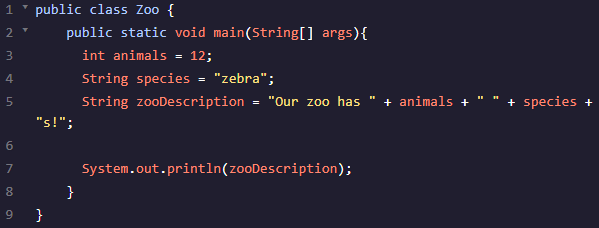
        In this lesson, it mainly focused on one code which is the double and also the System.out.println().
       Then followed by lots of examples that lets me practice the codes that I have learned from last lesson and the lesson before.


      • The modulo operator %, gives us the remainder after two numbers are divided.
      Java has relational operators for numeric datatypes that make booleancomparisons. 

      • less than (<) and greater than (>), which help us solve our withdrawal problem.
      • To check if two variables are not equal, we can use !=
      • We could use greater than or equal to, >=, or less than or equal to, <=
      • Here's another way of printing if two variables are equal or not.

      Then it teaches about Strings and the format of typing it.

      What I learned in this lesson...


      What I'll be doing tomorrow...

      I will be moving onto the next lesson which is JAVA: INTRODUCTION TO CLASSES.

      Java(2)---LEARN JAVA: VARIABLES

      LEARN JAVA: VARIABLES

      What this lesson is about...
      Introduce these built-in types and more: 
         types of these variables are int, double, and boolean
      • ints hold positive numbers, negative numbers, and zero. They do not store fractions or numbers with decimals in them. (Declares a variable)
      • To declare a variable of type double, The double primitive data type can help. double can hold decimals as well as very large and very small numbers.
      • boolean values help navigate decisions in our programs. Answered with a boolean, a type that references one of two values: true or false.
      • The char data type can hold any character, like a letter, space, or punctuation mark.
      Expected Grades:
      The char data type can hold any character, like a letter, space, or punctuation mark.

      • use Strings, which are objects, instead of primitives. Strings hold sequences of characters
      What I learned in this lesson...

      clearspan style="font-size: large;">NOTES: The differences between the Integer and String objects in Java are: Integer can be converted to String, but String cannot be converted to Integer. Integer is a numeric value and String is a character value represented in quotes.

      What I'm doing tomorrow...

      I will be moving onto the next lesson which is LEARN JAVA: MANIPULATING VARIABLES

      Monday, April 1, 2019

      Java (1)---INTRODUCTION TO JAVA

      Introduction to Java

      Java programming language


      • release in 1995
      • simple, portable, secure, and robust
      • Java Virtual Machine---ensures the same Java code can be run on different operating systems and platforms
      • Sun Microsystems’ slogan for Java was “write once, run everywhere”.


      public, static, and void are syntax we’ll learn about in future lessons. 
      String[] args is a placeholder for information we want to pass into our program. 
      main() method which lists our program tasks
      println is short for “print line”. 
      We’ll use System.out.println()whenever we want a program to write a message to the screen.
      Must use double quotes!

      Using the comment lines:
      • When comments are short we use the single-line syntax: //
      • When comments are long we use the multi-line syntax: /* and */.
      Java does not interpret whitespace, the areas of the code without syntax, but humans use whitespace to read code without difficulty.

      Java does interpret semicolons--- used to mark the end of a statement, one line of code that performs a single task.

      Java is a compiled programming language, meaning the code we write in a .java file is transformed into byte code by a compiler before it is executed by the Java Virtual Machine on your computer.

      The compiling process catches mistakes before the computer runs our code.
      ls is short for "list" and this command lists all the available files.

      What I learned in this lesson: 
        I had a basic understanding of how Java programming language works, and I noticed that lots of languages in other language that I've learned is also useful in Java such as the Comment line, Compiling, Executable and Defining.
      What I'm doing tomorrow...
        I will be moving onto the next lesson in this unit, which is LEARN JAVA: VARIABLES.